Purchasing licenses via Microsoft
You can purchase Docubird licenses directly through Microsoft. The entire purchasing process is handled within the Microsoft 365 admin center or via the Microsoft Marketplace. Below you’ll find what you need and how to complete the purchase step by step.
Purchasing via Microsoft 365
Payment methods for managed environments
Licenses are purchased through the Microsoft Marketplace. Monthly or yearly fees are paid directly to Microsoft. Before you proceed, first decide how you want to pay, so you know whether your IT partner needs to be involved. There are two options:
-
Option 1: Pay with a business credit card (global admin or billing admin-right required)
Complete the payment yourself. If needed, ask your IT partner to grant Billing Admin rights.
-
Option 2: Pay via Azure Plan on invoice (can be setup by your IT-partner)
Ask your IT partner to link an Azure Plan to the tenant, so this can be selected as a payment method when prompted.
The purchase process can be completed by someone with the Global Admin or Billing Admin role. If this is your IT partner, you can forward these instructions to them.
1. Purchase licenses

How it works:
- Decide your preferred payment method
- Open the Microsoft 365 admin center or Microsoft Marketplace.
-
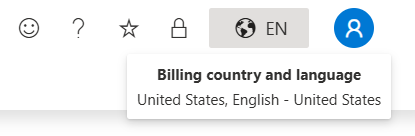
Check in the top-right corner that the correct billing country and language are selected.
- Search for Docubird's product page.
- Click Get it now.
- If asked, log in with your Microsoft 365-account to access the Azure Portal
- Select your preferred plan:
- Docubird has fixed rates up to 99 users.
- Contact us for enterprise deals, or select your Private Offer through 'Change plan'.
- Enter the desired billing period, automatic renewal, and number of users.
- Enter the payment method. Billing is handled directly by Microsoft.
- Click Configure your SaaS account to complete the purchase.
- Enter de required contactdetails in order to receive further activation instructions.
After payment is processed, the license will be automatically activated.
Approval Consent Rights
After activating the license or licenses, an administrator must approve the required permissions for Docubird once. Once this is completed, all users within the tenant can use the license.
- Go to app.docubird.com
- Approve the Microsoft consent permissions pop-up
More information on the required permissions can be found in Permissions of the Docubird app.